
Updating an EVduty Charging Station
If your EVduty charging station is an older model that has never been connected to the Internet, its internal software (firmware) may need to be updated before you can add it to the Club Roulez Électrique.
Step 1 – Connect to the hotspot network
To access the station's settings, you must first connect to the hotspot network it emits. In your mobile device's Wi-Fi settings, find the station's network. Its name will look like one of the following formats:
- EVduty-EVC30-XXXXX
- EVduty-EVC40-XXXXX
- EVduty-EVC48-XXXXX
Note: If no network appears, cut the power to the station by turning off the circuit breaker for 10 seconds, then turn it back on. Then check if the hotspot network appears.
Connect your device to this network. You will probably receive a notification indicating that this network does not have Internet access. This is normal. Choose “Use this network anyway” (or the equivalent option).
Tip: Your phone might automatically switch to mobile data or your main Wi-Fi network. If this happens, turn off mobile data and temporarily forget your main Wi-Fi network while performing the operation.
Step 2 – Open the Web interface
- Open a Web browser on your device.
- Enter the following address in the address bar:
192.168.4.1 - Log in with the following credentials:
- Username:
admin - Password:
evduty
- Username:
Step 3 – Check the firmware version
Locate the version number displayed in the interface:
- If no number appears, or if the version is less than 1.5, the update is necessary.
Step 4 – Connect the station to your main Wi-Fi network
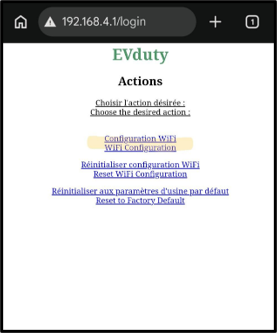
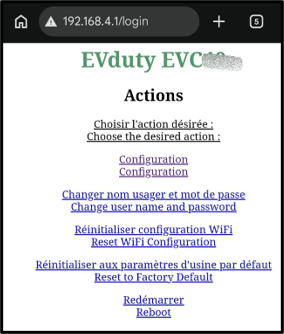
Depending on the firmware version, you will see one of the two following screens:
Screen A
Screen B
If you see Screen A:
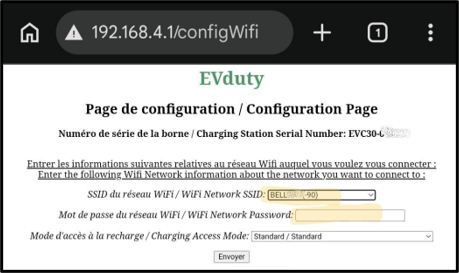
- Click on “Wifi Configuration”.
- Choose your main Wi-Fi network.
- Enter the password, then click on “Send”.
If you see Screen B:
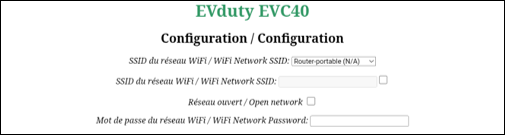
- Click on “Configuration”.
- Choose your main Wi-Fi network.
- Uncheck the “Open network” box.
- Enter the password, then click on “Send”.
Step 5 – Let the station update
Disconnect your mobile device from the station's hotspot network. Your station should then connect to your main Wi-Fi network and thus access the Internet.
Wait about 15 minutes: the station should update itself, without any intervention on your part.
To verify that the update has been completed, reconnect to the hotspot (see steps 1 and 2) and check the version number.
What next?
You can now add your station to the Club Roulez Électrique platform using the automatic procedure (with the mobile app) or the manual procedure (see the Club documentation).